A strong developer portfolio does not need a custom stack, a paid hosting plan, or weeks of design work. GitHub and Markdown are enough to build a clean, professional portfolio that showcases your projects, writing, and technical judgment in a format recruiters and developers already understand. GitHub supports profile READMEs, repository READMEs, and GitHub Pages, while Markdown gives you a fast way to structure content that stays easy to maintain over time.
The real advantage of this setup is not just convenience. A GitHub-based portfolio shows your public code, documentation habits, commit activity, and project organization in one place, which makes it more credible than a polished personal site with no visible work behind it.
Why GitHub and Markdown Work
GitHub is already a trusted platform for evaluating developers because it shows real artifacts: repositories, commits, issue activity, collaboration, and documentation. A portfolio built there can function as both a personal brand hub and a practical proof of work. Community advice around job applications consistently points to keeping public repositories clean, documented, and easy for recruiters to explore.
Markdown is the ideal content layer for this because it is simple, portable, and built directly into GitHub. GitHub renders Markdown natively in profile READMEs and repository READMEs, and GitHub Pages can also build Markdown-based sites, often through Jekyll, whenever you push updates.
This combination gives you three useful portfolio surfaces:
- A profile README that appears on your GitHub profile.
- Project READMEs that explain individual repositories.
- A GitHub Pages site, often hosted from
username.github.io, for a more polished public portfolio.
Start with Your Profile README
The simplest portfolio entry point is your GitHub profile README. GitHub displays it on your profile page when you create a public repository with the exact same name as your username and place a README.md file in the root.
This README should act like a homepage, not a resume dump. A solid structure includes:
- A short introduction with your role and focus.
- A brief list of technologies you actually use.
- Links to featured repositories.
- A small “currently working on” or “currently learning” section.
- Contact links or a portfolio site link.
Keep it concise and readable. Recruiters and technical leads often skim quickly, so the goal is to give them a reason to click deeper into your best work rather than burying them in too much text on the first screen.
Build a GitHub Pages Site
If you want a more polished portfolio, create a public repository named username.github.io, then enable GitHub Pages in the repository settings. GitHub Pages will publish your site at the matching URL, and GitHub recognizes this naming convention specifically for portfolio-style personal sites.
A Markdown-based GitHub Pages portfolio is useful because it stays lightweight and easy to update. GitHub Pages can rebuild your site from Markdown content when you commit changes, which means you can maintain your portfolio with the same workflow you already use for code.
For many developers, the best setup is to use both:
- A profile README for quick visibility inside GitHub.
- A GitHub Pages site for a cleaner, more structured portfolio experience.
Choose the Right Projects
The quality of your portfolio depends more on project selection than on design. A few well-documented, relevant projects are stronger than a large number of unfinished or poorly explained repositories. Guidance on building a strong GitHub portfolio repeatedly emphasizes choosing real projects, keeping repositories organized, and documenting them properly.
Good portfolio projects usually show one or more of the following:
- Problem solving with a clear use case.
- Clean architecture or thoughtful code structure.
- Familiar tools used well, such as React, Python, Node.js, Docker, or SQL.
- Evidence of maintenance, testing, or iteration.
- Good documentation and setup instructions.
A practical target is three to five featured repositories. One can be a polished flagship project, one can show backend or data skills, one can demonstrate frontend or UX ability, and one can highlight automation, tooling, or open-source contribution. GitHub portfolio templates also recommend marking featured repos clearly and keeping descriptions concise but informative.
Write Better READMEs
Your README files often matter as much as your code. A project without a README looks incomplete, while a strong README immediately signals professionalism and makes it easier for someone to understand what the project does, why it matters, and how to run it. One portfolio guide explicitly lists the README as essential and recommends including the project name, description, features, tech stack, installation steps, screenshots, and live demo link.
A strong project README should usually include:
- Project title and one-sentence summary.
- Problem statement or purpose.
- Feature list.
- Tech stack.
- Installation and usage steps.
- Screenshots or demo links.
- Notes about testing, deployment, or limitations.
GitHub also gives repository READMEs strong visibility. If a repo contains more than one README, GitHub prioritizes the .github directory first, then the root, then docs, and it automatically surfaces the chosen README to visitors.
Use Markdown Well
Markdown is not just a formatting convenience; it shapes how readable and professional your portfolio feels. Clear headings, short paragraphs, code fences, bullet lists, tables, and links make your portfolio easier to scan and more credible for technical readers. GitHub Flavored Markdown is supported directly in profile READMEs and repository READMEs, so you can build polished content without extra tooling.
A few Markdown practices matter most:
- Use headings to create a clear structure.
- Keep paragraphs short.
- Use fenced code blocks for commands and setup examples.
- Add internal links or a table of contents for longer pages.
- Use screenshots and demo links where they genuinely help.
GitHub also auto-generates an outline for rendered Markdown files based on section headings, which rewards good structure and makes longer pages easier to navigate.
Add Badges Carefully
Badges can improve a portfolio when they add real information, such as build status, coverage, license, or deployment state. Good badge practice is to keep them relevant, group related badges together, place them near the top of the README, and avoid cluttering the page with too many icons. Guidance on GitHub Markdown badges recommends keeping the count reasonable and making badges clickable so readers can inspect the underlying signal.
That said, badges should support the story of the project, not replace it. A portfolio full of flashy badges but weak documentation or unclear project goals feels noisy rather than professional. Use badges selectively for proof points, not decoration.
Keep Repositories Clean
A portfolio is judged not only by what you built, but also by how you present it. Clean repository names, consistent folder structures, comments where needed, and included tests or usage examples all help signal maturity. Advice for building a strong GitHub portfolio stresses that code organization, naming conventions, and test files strongly affect how visitors perceive your work.
Some practical cleanup rules:
- Use descriptive repository names.
- Remove abandoned experiments you do not want evaluated.
- Archive old work that no longer represents your current skill level.
- Pin your strongest repositories.
- Keep screenshots, demos, and setup instructions current.
A portfolio is a curated display, not a raw dump of everything you have ever coded. Your GitHub account can still contain experiments, but your visible top layer should direct attention toward the work that best matches the opportunities you want.
Recommended Structure
A simple GitHub-and-Markdown portfolio system can look like this:
- Profile README repository named exactly after your username.
- GitHub Pages repository named
username.github.io. - Three to five featured project repositories with strong READMEs.
- Consistent Markdown formatting across profile, projects, and site pages.
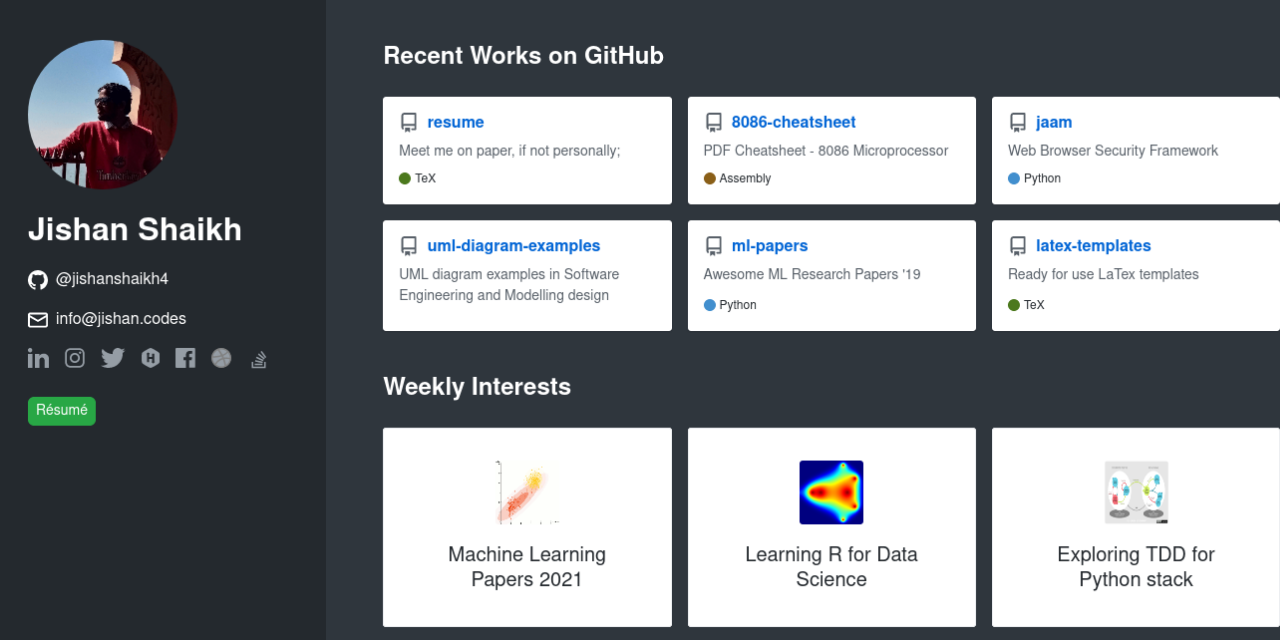
For example, your profile README might introduce you in a few lines and link to “Featured Projects,” “Writing,” and “Contact.” Your GitHub Pages site can then expand that into a more visual homepage with sections for selected projects, case studies, and technical interests. Each featured repository should have a README strong enough to stand on its own if someone lands there directly from search or a shared link.
Common Mistakes
One common mistake is focusing too much on visual polish and too little on substance. A portfolio with a sleek theme but weak repos, vague READMEs, and little evidence of problem solving will not perform as well as a simple Markdown-first portfolio with excellent project documentation.
Another mistake is overloading the profile README with too much content. Since the goal is to guide visitors toward your best work, the profile should be compact, structured, and selective rather than trying to include your full life story, every tool you have touched, or dozens of badges.
It is also a mistake to leave projects without context. Even strong code loses impact if visitors cannot quickly understand what it does, how to run it, and why it matters. That is why project READMEs are so important in GitHub-based portfolios.
Make It Feel Alive
A portfolio works best when it feels current. Regular updates to your featured projects, config files, profile README, and GitHub Pages content help show that you are active and still building. One GitHub portfolio template specifically recommends regular updates and keeping featured repositories curated rather than static.
You do not need to redesign everything constantly. Small updates are enough: improve a README, add a screenshot, document a deployment flow, pin a better repo, or publish a short case study in Markdown. Because Markdown is so lightweight, maintaining your portfolio becomes a normal part of your developer workflow rather than a separate website project.
Creating a developer portfolio with GitHub and Markdown is effective because it combines visibility, proof of work, and low maintenance. When done well, it gives employers, clients, and collaborators a fast way to understand not just what you say you can build, but how you actually build it.